
Vertical scan

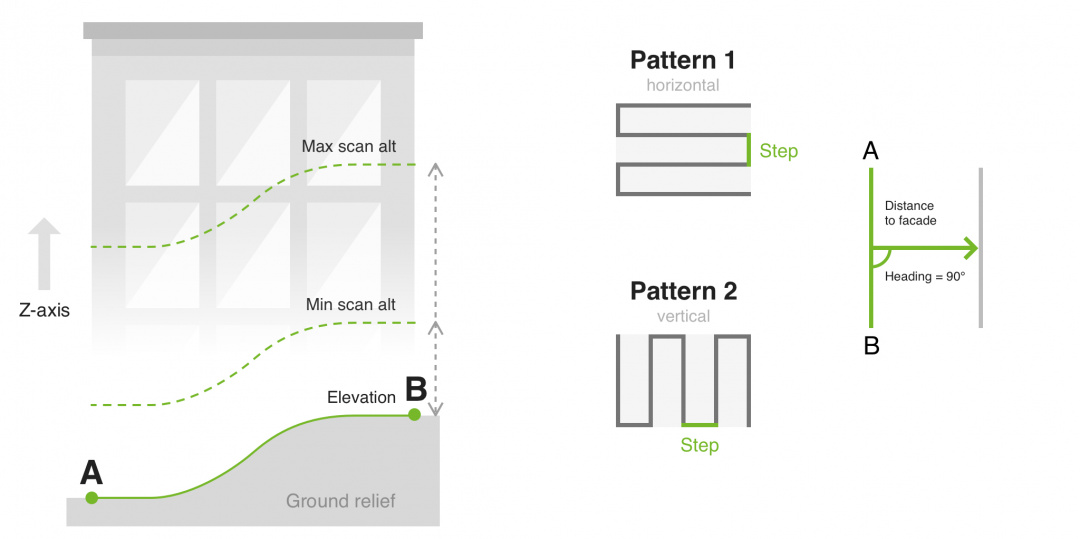
The vertical scan creates a flight route to scan vertical objects. The calculation of the route is similar to Photogrammetry's tool only for vertical objects. It is implied, that the scanning zone is always rectangular, limited by vertical lines passing through A and B and horizontal lines on the minimum and maximum height.
Parameter | Control | Discription |
|---|---|---|
Turn type | Input field allow to change drone turn type |
|
Minimum height (AGL) | Input field allowing to specify minimum height | Specifies minimum height above ground relief |
Maximum height (AGL) | Input field allowing to specify maximum height | Specifies maximum height above ground relief |
Distance to facade | Input field allowing to specify the distance to facade | Specifies drone distance to the facade |
Camera | Drop down list containing cameras attached to the vehicle profile | Parameter is mandatory |
Line Spacing: | Input field allowing to specify overlap in percentage | Specifies overlap percentage between subsequent shots on a single forward pass |
Line Spacing: | Input field allowing to specify side distance in meters | Specifies side distance meters |
Pattern | Dropdown with two values: | Specifies scan pattern type |
Vertical speed | Input field allowing to specify vertical speed | Specifies required vertical speed |
Horizontal speed | Input field allowing to specify horizontal speed | Specifies required horizontal speed |
Follow terrain | Checkbox | Allows the UAV to automatically adjust altitude during flights based on current elevation |
AGL Tolerance | Input field allowing to specify how precisely the UAV should follow required altitude above ground | To maintain specified height additional waypoints will be added if the difference of height is larger than AGL tolerance. The smaller the AGL tolerance value, the more amount of waypoints will be generated. If AGL tolerance is set 0 (zero) UAV’s altitude will be constant throughout the route, but many additional waypoints will be added. |
A vertical scan scanning zone is always a vertical rectangle with vertical (default) or horizontal flight pattern.
• During the flight, the vehicle will always face a facade;
• Turn type is Stop & turn
• «Camera by time» automatic triggering is calculated based on the distance to the façade, camera FOV, and vehicle speed (depending on the selected pattern vertical or horizontal)
After the route is calculated successfully, the message will show:
- Vertical scan area, resulting GSD, step between forwarding passes
- Calculated the number of camera shots and the interval between shots
Scanning will start from the corner of the rectangle, which is closest to the first waypoint, or if no waypoint is set before the Vertical scan - from the left bottom corner.
Vertical scan-supported actions:
• Camera control
• Camera trigger
• Camera by time
• Wait.